The Universal Use of ComfyUI: From Image Generation to Complete AI Workflows
Affiliate disclosure: As an Amazon Associate I earn from qualifying purchases.
ComfyUI began as a powerful way to build Stable Diffusion workflows through a visual node-based interface. Over time, however, it has evolved into something much broader: a general-purpose environment for designing, testing, automating, and deploying generative-AI workflows.
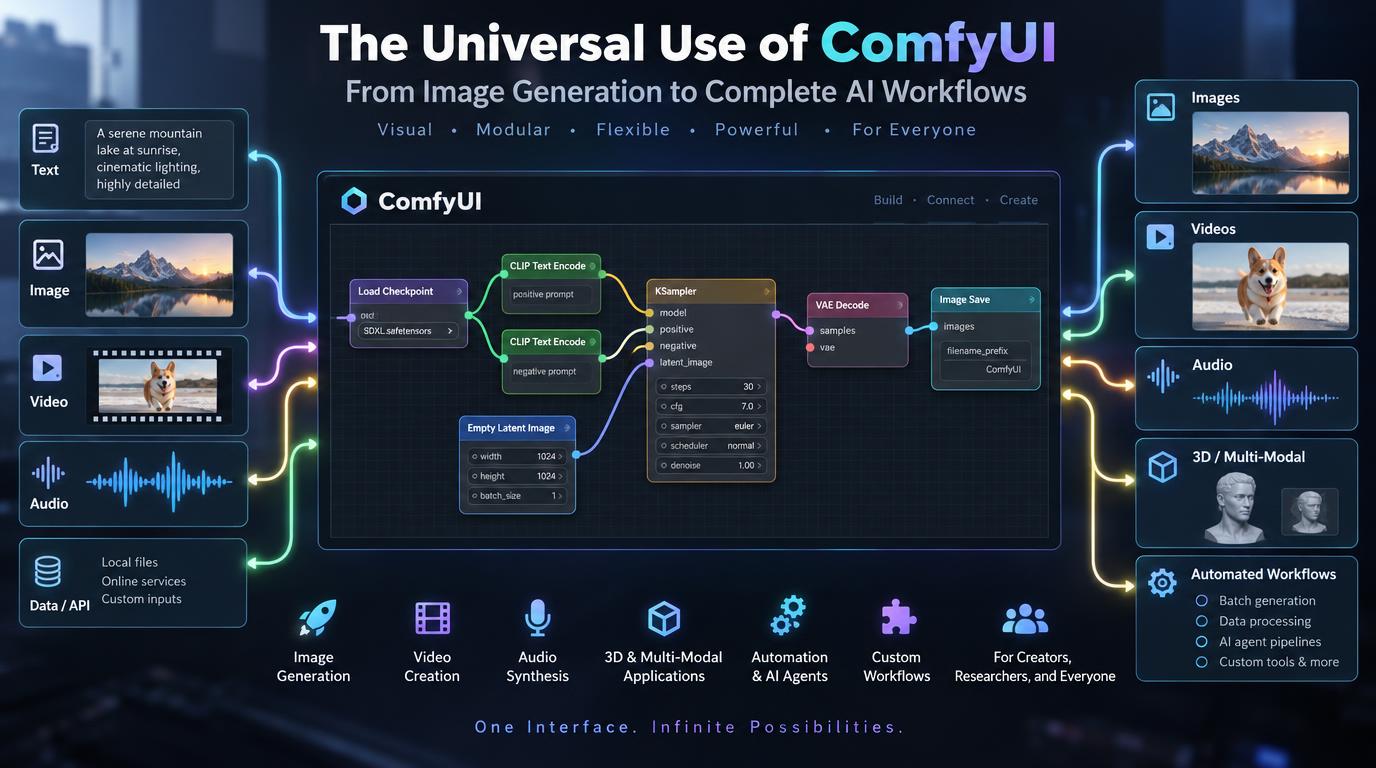
Instead of limiting users to a fixed interface with a small set of controls, ComfyUI represents each operation as a node. Models, prompts, samplers, encoders, images, masks, conditioning inputs, upscalers, video components, APIs, and other processing steps can all be connected visually.
This modular structure is one of the main reasons ComfyUI has become so widely used. It allows artists, developers, researchers, studios, and businesses to build workflows that fit their exact requirements rather than adapting their work to a rigid application.
Official ComfyUI documentation now describes it as an open-source node-based application and inference engine for generative AI, supporting workflows for image, video, audio, and 3D generation.
ComfyUI as a Universal Generative-AI Interface
The key idea behind ComfyUI is simple: instead of hiding the AI pipeline, it exposes it.
A conventional AI image generator might provide a prompt box, a few sliders, and a Generate button. ComfyUI allows the user to see and control the entire process.
A basic workflow might include separate nodes for:
- loading a model,
- encoding a prompt,
- generating latent noise,
- running a sampler,
- decoding the result,
- and saving the final image.
More advanced workflows can contain dozens or even hundreds of interconnected nodes.
This makes ComfyUI less like a traditional AI application and more like a visual programming environment for generative AI.
That distinction is important because it explains why the platform can be adapted to so many different tasks.
Image Generation
Image generation remains one of the most common uses of ComfyUI.
Users can build workflows around a wide range of image models, including Stable Diffusion families, SDXL, Flux, Stable Cascade, SD3-class models, and other supported architectures.
Instead of relying on a predefined generation interface, users can customize nearly every part of the pipeline.
They can control:
- checkpoint selection,
- prompt conditioning,
- negative prompts,
- sampling algorithms,
- schedulers,
- resolution,
- latent processing,
- ControlNet inputs,
- reference images,
- LoRAs,
- VAEs,
- post-processing,
- and output formats.
This makes ComfyUI especially valuable for users who want reproducible and highly controlled image generation.
The official project emphasizes that workflows can be built and reused visually without requiring users to write code.
AI Image Editing
ComfyUI is also widely used as an image-editing platform.
Rather than limiting users to simple text-to-image generation, workflows can be designed for:
- inpainting,
- outpainting,
- object replacement,
- background removal,
- background replacement,
- face modification,
- product editing,
- style transfer,
- image restoration,
- color correction,
- relighting,
- and selective regional editing.
Masks can be incorporated into workflows so that only specific areas of an image are modified.
This makes ComfyUI suitable for professional editing pipelines where precise control is required.
An editor can, for example, isolate a product, change its environment, upscale it, adjust its lighting, and export the final image automatically within a single workflow.
Multi-Model Workflows
One of ComfyUI’s greatest strengths is that a workflow does not have to depend on a single model.
Different models can be combined to perform different tasks.
For example, a workflow might use one model to generate an image, another to detect depth, another to refine facial details, another to upscale the result, and a final model to remove the background.
These components can all be linked inside one graph.
This allows ComfyUI to function as an orchestration layer between multiple AI systems.
Instead of asking which single model is best, users can design a pipeline in which each model performs the task it handles most effectively.
Video Generation
ComfyUI has increasingly become an important interface for generative video.
Its node-based architecture is particularly well suited to video workflows because video generation often requires many stages.
A pipeline might involve:
- image generation,
- reference-frame preparation,
- motion conditioning,
- video diffusion,
- interpolation,
- frame enhancement,
- upscaling,
- and final encoding.
ComfyUI can coordinate these operations in one workflow.
The project’s current documentation explicitly positions ComfyUI as a platform for image, video, audio, and 3D generation rather than only image diffusion.
This broader support has made ComfyUI increasingly useful for creators experimenting with text-to-video, image-to-video, character animation, cinematic sequences, and AI-assisted filmmaking.
Audio Workflows
Although ComfyUI is still most strongly associated with visual generation, its modular design also supports audio-oriented AI workflows.
Custom nodes and model integrations can be used for tasks such as:
- speech generation,
- music generation,
- voice processing,
- sound effects,
- audio conditioning,
- and synchronization between audio and video.
The significance of this is not simply that ComfyUI can process audio.
It means that audio can become one part of a much larger multimedia workflow.
For example, an automated pipeline could generate visual scenes, create narration, generate background music, and prepare outputs for video assembly.
This moves ComfyUI closer to being a complete generative-media environment.
3D Generation
ComfyUI is also expanding into 3D workflows.
Generative 3D systems can be connected to pipelines for tasks such as:
- image-to-3D conversion,
- text-to-3D generation,
- depth estimation,
- normal-map creation,
- texture generation,
- and asset preparation.
For game development, product visualization, virtual environments, and digital content creation, this can be particularly useful.
A designer might generate a concept image, convert it into a 3D asset, create textures, generate alternative materials, and prepare presentation renders using interconnected AI processes.
The ability to combine different media types is where the idea of ComfyUI as a universal generative interface becomes especially powerful.
ControlNet and Structural Control
Another major use of ComfyUI involves controlled image generation.
Generative models can produce attractive images, but professional workflows often require predictable composition.
ControlNet and similar conditioning systems allow users to guide generation using information such as:
- poses,
- depth maps,
- edges,
- sketches,
- segmentation maps,
- line art,
- and spatial layouts.
ComfyUI makes these conditioning systems easy to integrate into larger workflows.
A pose image can be processed automatically, converted into conditioning data, passed into the generation model, refined, and then sent to an upscaler.
This level of control is extremely valuable for concept art, character design, architecture, fashion, advertising, and visual storytelling.
LoRA and Style Workflows
ComfyUI is also widely used for LoRA-based generation.
LoRAs allow users to introduce specific styles, characters, products, visual concepts, or other learned characteristics into a base model.
In ComfyUI, users can combine multiple LoRAs, adjust their individual strengths, switch them dynamically, or use them only at particular stages of a workflow.
This flexibility is useful for studios and creators who need consistent visual identities.
A business, for example, could develop a custom style LoRA and integrate it into a workflow used across hundreds of automatically generated marketing images.
Upscaling and Image Enhancement
Image enhancement is another major area where ComfyUI is frequently used.
A workflow can generate an image at one resolution and then pass it through multiple refinement stages.
These can include:
- latent upscaling,
- dedicated super-resolution models,
- detail enhancement,
- face restoration,
- sharpening,
- denoising,
- and tiled processing.
Because all of these steps can be connected automatically, ComfyUI can turn a relatively simple generation into a production-ready high-resolution asset.
This makes it particularly useful for print, advertising, product imagery, concept art, and large-format design.
Batch Production and Automation
ComfyUI becomes especially powerful when workflows are repeated at scale.
Instead of manually generating one image at a time, workflows can process batches of prompts, images, products, characters, or datasets.
For example, an e-commerce business could automatically:
- load a product photograph,
- remove the background,
- generate multiple lifestyle scenes,
- resize each image,
- upscale the results,
- apply a consistent visual style,
- and save them using structured filenames.
Once built, the same workflow can process many products.
This is where ComfyUI moves from a creative experiment into a production tool.
ComfyUI as an API and Backend
ComfyUI is not limited to interactive use through its visual interface.
Its workflows can also be integrated into applications and production systems through APIs.
The official project documentation highlights a local API, reusable subgraphs, workflow templates, and application-oriented execution.
This means developers can build a workflow visually and then call that workflow programmatically.
A website, for example, could allow a user to upload a photograph and select a style. Behind the scenes, the application could send those inputs into a ComfyUI workflow running on a server.
The user never needs to see the node graph.
This allows ComfyUI to function as an AI backend for:
- SaaS applications,
- mobile apps,
- creative platforms,
- internal company tools,
- image-processing services,
- automation systems,
- and enterprise pipelines.
Custom Nodes and Extensibility
Another reason ComfyUI has become so versatile is its custom-node ecosystem.
Developers can create nodes that introduce new models, utilities, APIs, processing operations, file-handling tools, and external integrations.
This means that ComfyUI’s capabilities are not limited to what ships with the core application.
A workflow might include custom nodes for:
- external AI services,
- computer vision,
- metadata processing,
- database interaction,
- image analysis,
- prompt generation,
- file organization,
- cloud storage,
- or custom business logic.
The official documentation provides dedicated resources for developers building and sharing custom nodes through the Comfy ecosystem.
This extensibility is one of the main reasons ComfyUI can adapt rapidly as new generative models appear.
Local, Server, and Cloud Deployment
ComfyUI can operate in multiple environments.
It can run locally on personal hardware, on dedicated servers, or through cloud infrastructure.
The official project supports Windows, Linux, and macOS, while manual installations can work across multiple GPU types and hardware configurations.
Local use provides greater privacy and control. For local setups, the most important hardware spec is GPU memory (VRAM): it decides which models and resolutions run comfortably. A 16 GB card such as the ASUS Dual GeForce RTX 5060 Ti 16GB (affiliate link) is a sensible entry point, while a 32 GB card like the ASUS TUF Gaming GeForce RTX 5090 (affiliate link) has headroom for large image and video models. Model files also take up a lot of space, so a fast NVMe drive such as the Samsung 990 PRO 2TB (affiliate link) keeps load times short.
Server deployment allows multiple applications or users to access centralized workflows.
Cloud deployment provides access to stronger GPUs without requiring local hardware.
This flexibility makes ComfyUI useful for individual artists as well as larger production environments.
Efficient Workflow Execution
ComfyUI is also designed to avoid unnecessary processing.
Its graph-based architecture can identify which parts of a workflow have changed and avoid repeating unaffected operations.
The project also includes memory-management and model-offloading techniques intended to make complex workflows more practical on limited hardware.
For users experimenting with large models or multi-stage workflows, these optimizations can make a significant difference.
Instead of treating every generation as an entirely new pipeline, ComfyUI can reuse portions of an existing workflow when appropriate.
Use in Professional Creative Production
ComfyUI is increasingly relevant to professional creative work.
Advertising teams can build repeatable branded-image workflows.
Film and video teams can experiment with storyboards, environments, visual effects, and AI-generated footage.
Fashion companies can create product scenes and styling concepts.
Game developers can generate characters, environments, textures, and concept assets.
Architects can turn sketches, depth maps, and structural references into visual concepts.
E-commerce companies can automate product imagery.
The important point is that ComfyUI does not prescribe one use case. Its value comes from allowing each organization to design a pipeline that fits its own production process.
Use in AI Research
ComfyUI is also valuable for experimentation.
Researchers and advanced users can inspect individual stages of a generative pipeline instead of treating the model as a black box.
Different samplers, conditioning methods, models, prompts, schedulers, and processing techniques can be compared within structured workflows.
Because graphs can be saved and shared, experiments are also easier to reproduce.
This makes ComfyUI useful not only for generating media but also for understanding how different generative techniques interact.
Reusable Workflows
One of the most important features of ComfyUI is workflow reuse.
A complex graph may take considerable time to design, but once completed, it can be saved and reused.
ComfyUI also supports reusable subgraphs and workflow templates, allowing common sections of a pipeline to be packaged and incorporated into other projects.
This changes the way users think about AI creation.
Instead of designing each generation from scratch, creators can build reusable AI production systems.
A photographer might maintain a portrait-enhancement workflow.
An online retailer might have a product-image workflow.
A studio might maintain a character-consistency pipeline.
A developer might maintain a video-generation backend.
The workflow itself becomes a reusable asset.
ComfyUI and AI Agents
Another emerging use case is connecting ComfyUI to AI agents.
The official ComfyUI documentation now includes support for agent-oriented integration through MCP, allowing AI agents to interact with generative workflows involving images, video, audio, and 3D content.
This creates interesting possibilities.
An AI agent could potentially analyze a task, select an appropriate workflow, generate visual assets, inspect the output, and trigger additional processing.
Instead of a human manually operating every node, ComfyUI can become the execution layer behind a more autonomous system.
This may become one of the most important directions for the platform.
Why ComfyUI Is Becoming Universal
ComfyUI’s broad usefulness comes from a combination of several characteristics.
It is visual enough for creators to understand, technical enough for developers to customize, modular enough to support rapidly changing models, and programmable enough to integrate into larger systems.
It can act as a user interface, experimentation environment, workflow designer, inference engine, automation platform, or backend service.
Most importantly, it does not force generative AI into one particular workflow.
Instead, it provides building blocks.
Users decide how those building blocks should be assembled.
The Future of ComfyUI
Generative AI is evolving quickly.
Image models are becoming multimodal editors. Video models are becoming more controllable. 3D generation is improving. Audio generation is becoming more sophisticated. AI agents are beginning to coordinate multiple models and tools.
A modular platform such as ComfyUI is well positioned for this environment because it does not depend on a single model or media type.
As models change, new nodes can be added.
As workflows become more complicated, they can be represented visually.
As businesses move from experimentation toward production, those workflows can be automated and exposed through APIs.
The result is a platform that can evolve alongside generative AI itself.
Final Thoughts
ComfyUI should no longer be viewed simply as an alternative interface for Stable Diffusion.
It has evolved into a flexible visual framework for building generative-AI systems.
Its uses now extend across image generation, editing, video, audio, 3D, model orchestration, automation, API deployment, AI agents, research, and professional content production.
The node-based approach is what makes this possible.
Instead of providing one fixed AI tool, ComfyUI provides a framework for connecting many tools together.
That is why its role is becoming increasingly universal.
As generative AI continues to expand into new formats, models, and industries, ComfyUI’s greatest strength may be its ability to serve as the layer that connects them all.